Showing posts with label Server. Show all posts

Tuesday, 21 February 2017

SQL server is blank while adding Additional Management Server in SCOM 2012 R2

SQL server is blank while adding Additional Management Server in SCOM 2012 R2


  • I faced a weird issue today. As i was trying to add additional SCOM management Server , The SQL page where we select the OperationsManger DB was blank.
  • After some investigation i found that the Management Server was already showing in the SCOM Management server view as Unmonitored.
  • On i deleted it and tried again it worked and was able to see the OperationsManager DB

Tuesday, 17 January 2017

Install a Linux SQL Server VM in Azure Step by Step Tutorial

 Install a Linux SQL Server VM in Azure Step by Step Tutorial


To Create a Linux VM with SQL Server installed

  • Open the Azure portal.
  • Click New on the left.
  • In the New blade, click Compute.
  • Click See All next to the Featured Apps heading.
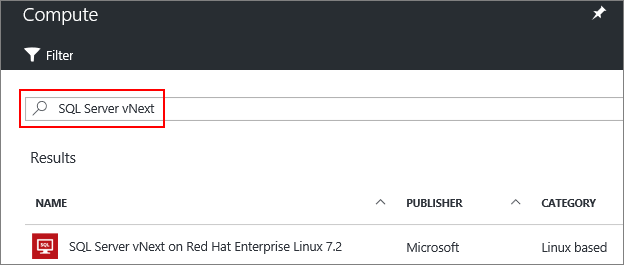
  • In the search box, type SQL Server vNext, and press Enter to start the search.


  • Select a SQL Server vNext image from the search results.
  • Click Create.
  • On the Basics blade, fill in the details for your Linux VM.
  • Click OK.
  • On the Size blade, choose a machine size. For development and functional testing, we recommend a VM size of DS2 or higher. For performance testing, use DS13 or higher.

  • Click Select.
  • On the Settings blade, you can make changes to the settings or keep the default settings.
  • Click OK.
  • On the Summary page, click OK to create the VM.

Install SQL Server tools on Red Hat Enterprise Linux Step by Step tutorial

Install SQL Server tools on Red Hat Enterprise Linux


  • Enter superuser mode.

sudo su


  • Download the Microsoft Red Hat repository configuration file.


curl https://packages.microsoft.com/config/rhel/7/prod.repo > /etc/yum.repos.d/msprod.repo


  • Exit superuser mode.


exit


  • Run the following commands to install 'mssql-tools' with the unixODBC developer package.


sudo yum update
sudo yum install mssql-tools unixODBC-utf16-devel

Uninstall SQL Server on Red Hat Enterprise Linux Step by Step Tutorial

Uninstall SQL Server on Red Hat Enterprise Linux Step by Step Tutorial


  • In order to remove the mssql-server package, follow these steps:

  • Run the remove command. This will delete the package and remove the files under /opt/mssql/. However, this command will not affect user-generated and system database files, which are located under /var/opt/mssql.

sudo yum remove mssql-server

  • Removing the package will not delete the generated database files. If you want to delete the database files use the following command:

sudo rm -rf /var/opt/mssql/

Upgrade SQL Server on Red Hat Enterprise Linux Step by Step Totorial

Upgrade SQL Server on Red Hat Enterprise Linux Step by Step Totorial


  • In order to upgrade the mssql-server package, execute the following command:

sudo yum update mssql-server


  • These commands will download the newest package and replace the binaries located under /opt/mssql/. The user generated databases and system databases will not be affected by this operation.

Install SQL Server on Red Hat Enterprise Linux 7.3 Step by Step Tutorial

Install SQL Server on Red Hat Enterprise Linux 7.3 Step by Step Tutorial


Video:


  • You need at least 3.25GB of memory to run SQL Server on Linux. 
  • To install the mssql-server package on RHEL, follow these steps:
  • Enter superuser mode.

sudo su

  • Download the Microsoft SQL Server Red Hat repository configuration file:

curl https://packages.microsoft.com/config/rhel/7/mssql-server.repo > /etc/yum.repos.d/mssql-server.repo

  • Exit superuser mode.

exit

  • Run the following commands to install SQL Server:

sudo yum install -y mssql-server

  • After the package installation finishes, run the configuration script and follow the prompts. Make sure to specify a strong password for the SA account (Minimum length 8 characters, including uppercase and lowercase letters, base 10 digits and/or non-alphanumeric symbols).

sudo /opt/mssql/bin/sqlservr-setup

  • Once the configuration is done, verify that the service is running:

systemctl status mssql-server

Saturday, 15 October 2016

SCCM 2012 R2 Log File for Windows Update Agent and WSUS Server issues

SCCM 2012 R2 Log File for Windows Update Agent and WSUS Server issues


Windows Update Agent

The following table lists the log files that contain information related to the Windows Update Agent.
Log name
Description
Computer with log file
WindowsUpdate.log
Records details about when the Windows Update Agent connects to the WSUS server and retrieves the software updates for compliance assessment and whether there are updates to the agent components.
Client

WSUS Server

The following table lists the log files that contain information related to the WSUS server.
Log name
Description
Computer with log file
Change.log
Records details about the WSUS server database information that has changed.
WSUS server
SoftwareDistribution.log
Records details about the software updates that are synchronized from the configured update source to the WSUS server database.
WSUS server

SCCM 2012 R2 Log Files for SCCM Exchange server connector issues

SCCM 2012 R2 Log Files for SCCM Exchange server connector issues


Exchange Server Connector

The following table lists logs that contain information related to the Exchange Server connector.
Log name
Description
Computer with log file
easdisc.log
Records the activities and the status of the Exchange Server connector.
Site server

SCCM 2012 R2 Server Install Log files

SCCM 2012 R2 Server Install Log files


Site Server Installation Log Files

The following table lists the log files that contain information related to site installation.
Log name
Description
Computer with log file
ConfigMgrPrereq.log
Records pre-requisite component evaluation and installation activities.
Site server
ConfigMgrSetup.log
Records detailed output from site server setup.
Site Server
ConfigMgrSetupWizard.log
Records information related to activity in the Setup wizard.
Site Server
SMS_BOOTSTRAP.log
Records information about the progress of launching the secondary site installation process. Details of the actual setup process are contained in ConfigMgrSetup.log.
Site Server
smstsvc.log
Records information about the installation, use, and removal of a Windows service that is used to test network connectivity and permissions between servers, using the computer account of the server initiating the connection.
Site server and site systems

SCCM 2012 R2 Server Log Files Troubleshooting


SCCM 2012 R2 Server Log Files Troubleshooting

Configuration Manager Site Server Log Files

The following sections list log files found on the site server or related to specific site system roles.

Site Server and Site System Server Logs

The following table lists the log files found on the Configuration Manager site server and site system servers.
Log name
Description
Computer with log file
adctrl.log
Records enrollment processing activity.
Site server
ADForestDisc.log
Records Active Directory Forest Discovery actions.
Site server
ADService.log
Records account creation and security group details in Active Directory.
Site server
adsgdis.log
Records Active Directory Group Discovery actions.
Site server
adsysdis.log
Records Active Directory System Discovery actions.
Site server
adusrdis.log
Records Active Directory User Discovery actions.
Site server
ccm.log
Records client push installation activities.
Site server
CertMgr.log
Records the certificate activities for intra-site communications.
Site system server
chmgr.log
Records activities of the client health manager.
Site server
Cidm.log
Records changes to the client settings by the Client Install Data Manager (CIDM).
Site server
colleval.log
Records details about when collections are created, changed, and deleted by the Collection Evaluator.
Site server
compmon.log
Records the status of component threads monitored for the site server.
Site system server
compsumm.log
Records Component Status Summarizer tasks.
Site server
ComRegSetup.log
Records the initial installation of COM registration results for a site server.
Site system server
dataldr.log
Records information about the processing of Management Information Format (MIF) files and hardware inventory in the Configuration Manager database.
Site Server
ddm.log
Records activities of the discovery data manager.
Site server
despool.log
Records incoming site-to-site communication transfers.
Site server
distmgr.log
Records details about package creation, compression, delta replication, and information updates.
Site server
EPCtrlMgr.log
Records information about the synchronization of malware threat information from the Endpoint Protection site system role server into the Configuration Manager database.
Site server
EPMgr.log
Records the status of the Endpoint Protection site system role.
Site system server
EPSetup.log
Provides information about the installation of the Endpoint Protection site system role.
Site system server
EnrollSrv.log
Records activities of the enrollment service process.
Site system server
EnrollWeb.log
Records activities of the enrollment website process.
Site system server
fspmgr.log
Records activities of the fallback status point site system role.
Site system server
hman.log
Records information about site configuration changes, and the publishing of site information in Active Directory Domain Services.
Site server
Inboxast.log
Records the files that are moved from the management point to the corresponding INBOXES folder on the site server.
Site server
inboxmgr.log
Records file transfer activities between inbox folders.
Site server
inboxmon.log
Records the processing of inbox files and performance counter updates.
Site server
invproc.log
Records the forwarding of MIF files from a secondary site to its parent site.
Site server
migmctrl.log
Records information for Migration actions involving migration jobs, shared distribution points, and distribution point upgrades.
The top-level site in the System Center 2012 Configuration Manager hierarchy, and each child primary site
System_CAPS_noteNote
In a multi-primary site hierarchy, use the log file created at the central administration site.
mpcontrol.log
Records the registration of the management point with WINS. Records the availability of the management point every 10 minutes.
Site system server
mpfdm.log
Records the actions of the management point component that moves client files to the corresponding INBOXES folder on the site server.
Site system server
mpMSI.log
Records details of about the management point installation.
Site server
MPSetup.log
Records the management point installation wrapper process.
Site server
netdisc.log
Records Network Discovery actions.
Site server
ntsvrdis.log
Records the discovery activity of site system servers.
Site server
Objreplmgr
Records the processing of object change notifications for replication.
Site server
offermgr.log
Records advertisement updates.
Site server
offersum.log
Records the summarization of deployment status messages.
Site server
OfflineServicingMgr.log
Records the activities of applying updates to operating system image files.
Site server
outboxmon.log
Records the processing of outbox files and performance counter updates.
Site server
PerfSetup.log
Records the results of the installation of performance counters.
Site system server
PkgXferMgr.log
Records the actions of the SMS Executive component that is responsible for sending content from a primary site to a remote distribution point.
Site server
policypv.log
Records updates to the client policies to reflect changes to client settings or deployments.
Primary site server
rcmctrl.log
Records the activities of database replication between sites in the hierarchy.
Site server
replmgr.log
Records the replication of files between the site server components and the Scheduler component.
Site server
ResourceExplorer.log
Records errors, warnings, and information about running the Resource Explorer.
The computer that runs the Configuration Manager console
ruleengine.log
Records details about automatic deployment rules for the identification, content download, and software update group and deployment creation.
Site server
schedule.log
Records details about site-to-site job and file replication.
Site server
sender.log
Records the files that transfer by file-based replication between sites.
Site server
sinvproc.log
Records information about the processing of software inventory data to the site database.
Site server
sitecomp.log
Records details about the maintenance of the installed site components on all site system servers in the site.
Site server
sitectrl.log
Records site setting changes made to site control objects in the database.
Site server
sitestat.log
Records the availability and disk space monitoring process of all site systems.
Site server
SmsAdminUI.log
Records Configuration Manager console activity.
The computer that runs the Configuration Manager console
SMSAWEBSVCSetup.log
Records the installation activities of the Application Catalog web service.
Site system server
smsbkup.log
Records output from the site backup process.
Site server
smsdbmon.log
Records database changes.
Site server
SMSENROLLSRVSetup.log
Records the installation activities of the enrollment web service.
Site system server
SMSENROLLWEBSetup.log
Records the installation activities of the enrollment website.
Site system server
smsexec.log
Records the processing of all site server component threads.
Site server or site system server
SMSFSPSetup.log
Records messages generated by the installation of a fallback status point.
Site system server
SMSPORTALWEBSetup.log
Records the installation activities of the Application Catalog website.
Site system server
SMSProv.log
Records WMI provider access to the site database.
Computer with the SMS Provider
srsrpMSI.log
Records detailed results of the reporting point installation process from the MSI output.
Site system server
srsrpsetup.log
Records results of the reporting point installation process.
Site system server
statesys.log
Records the processing of state system messages.
Site server
statmgr.log
Records the writing of all status messages to the database.
Site server
swmproc.log
Records the processing of metering files and settings.
Site server

SCCM 2012 R2 Server Log Files


SCCM 2012 R2 Server Log Files Troubleshooting

Configuration Manager Site Server Log Files

The following sections list log files found on the site server or related to specific site system roles.

Site Server and Site System Server Logs

The following table lists the log files found on the Configuration Manager site server and site system servers.
Log name
Description
Computer with log file
adctrl.log
Records enrollment processing activity.
Site server
ADForestDisc.log
Records Active Directory Forest Discovery actions.
Site server
ADService.log
Records account creation and security group details in Active Directory.
Site server
adsgdis.log
Records Active Directory Group Discovery actions.
Site server
adsysdis.log
Records Active Directory System Discovery actions.
Site server
adusrdis.log
Records Active Directory User Discovery actions.
Site server
ccm.log
Records client push installation activities.
Site server
CertMgr.log
Records the certificate activities for intra-site communications.
Site system server
chmgr.log
Records activities of the client health manager.
Site server
Cidm.log
Records changes to the client settings by the Client Install Data Manager (CIDM).
Site server
colleval.log
Records details about when collections are created, changed, and deleted by the Collection Evaluator.
Site server
compmon.log
Records the status of component threads monitored for the site server.
Site system server
compsumm.log
Records Component Status Summarizer tasks.
Site server
ComRegSetup.log
Records the initial installation of COM registration results for a site server.
Site system server
dataldr.log
Records information about the processing of Management Information Format (MIF) files and hardware inventory in the Configuration Manager database.
Site Server
ddm.log
Records activities of the discovery data manager.
Site server
despool.log
Records incoming site-to-site communication transfers.
Site server
distmgr.log
Records details about package creation, compression, delta replication, and information updates.
Site server
EPCtrlMgr.log
Records information about the synchronization of malware threat information from the Endpoint Protection site system role server into the Configuration Manager database.
Site server
EPMgr.log
Records the status of the Endpoint Protection site system role.
Site system server
EPSetup.log
Provides information about the installation of the Endpoint Protection site system role.
Site system server
EnrollSrv.log
Records activities of the enrollment service process.
Site system server
EnrollWeb.log
Records activities of the enrollment website process.
Site system server
fspmgr.log
Records activities of the fallback status point site system role.
Site system server
hman.log
Records information about site configuration changes, and the publishing of site information in Active Directory Domain Services.
Site server
Inboxast.log
Records the files that are moved from the management point to the corresponding INBOXES folder on the site server.
Site server
inboxmgr.log
Records file transfer activities between inbox folders.
Site server
inboxmon.log
Records the processing of inbox files and performance counter updates.
Site server
invproc.log
Records the forwarding of MIF files from a secondary site to its parent site.
Site server
migmctrl.log
Records information for Migration actions involving migration jobs, shared distribution points, and distribution point upgrades.
The top-level site in the System Center 2012 Configuration Manager hierarchy, and each child primary site
System_CAPS_noteNote
In a multi-primary site hierarchy, use the log file created at the central administration site.
mpcontrol.log
Records the registration of the management point with WINS. Records the availability of the management point every 10 minutes.
Site system server
mpfdm.log
Records the actions of the management point component that moves client files to the corresponding INBOXES folder on the site server.
Site system server
mpMSI.log
Records details of about the management point installation.
Site server
MPSetup.log
Records the management point installation wrapper process.
Site server
netdisc.log
Records Network Discovery actions.
Site server
ntsvrdis.log
Records the discovery activity of site system servers.
Site server
Objreplmgr
Records the processing of object change notifications for replication.
Site server
offermgr.log
Records advertisement updates.
Site server
offersum.log
Records the summarization of deployment status messages.
Site server
OfflineServicingMgr.log
Records the activities of applying updates to operating system image files.
Site server
outboxmon.log
Records the processing of outbox files and performance counter updates.
Site server
PerfSetup.log
Records the results of the installation of performance counters.
Site system server
PkgXferMgr.log
Records the actions of the SMS Executive component that is responsible for sending content from a primary site to a remote distribution point.
Site server
policypv.log
Records updates to the client policies to reflect changes to client settings or deployments.
Primary site server
rcmctrl.log
Records the activities of database replication between sites in the hierarchy.
Site server
replmgr.log
Records the replication of files between the site server components and the Scheduler component.
Site server
ResourceExplorer.log
Records errors, warnings, and information about running the Resource Explorer.
The computer that runs the Configuration Manager console
ruleengine.log
Records details about automatic deployment rules for the identification, content download, and software update group and deployment creation.
Site server
schedule.log
Records details about site-to-site job and file replication.
Site server
sender.log
Records the files that transfer by file-based replication between sites.
Site server
sinvproc.log
Records information about the processing of software inventory data to the site database.
Site server
sitecomp.log
Records details about the maintenance of the installed site components on all site system servers in the site.
Site server
sitectrl.log
Records site setting changes made to site control objects in the database.
Site server
sitestat.log
Records the availability and disk space monitoring process of all site systems.
Site server
SmsAdminUI.log
Records Configuration Manager console activity.
The computer that runs the Configuration Manager console
SMSAWEBSVCSetup.log
Records the installation activities of the Application Catalog web service.
Site system server
smsbkup.log
Records output from the site backup process.
Site server
smsdbmon.log
Records database changes.
Site server
SMSENROLLSRVSetup.log
Records the installation activities of the enrollment web service.
Site system server
SMSENROLLWEBSetup.log
Records the installation activities of the enrollment website.
Site system server
smsexec.log
Records the processing of all site server component threads.
Site server or site system server
SMSFSPSetup.log
Records messages generated by the installation of a fallback status point.
Site system server
SMSPORTALWEBSetup.log
Records the installation activities of the Application Catalog website.
Site system server
SMSProv.log
Records WMI provider access to the site database.
Computer with the SMS Provider
srsrpMSI.log
Records detailed results of the reporting point installation process from the MSI output.
Site system server
srsrpsetup.log
Records results of the reporting point installation process.
Site system server
statesys.log
Records the processing of state system messages.
Site server
statmgr.log
Records the writing of all status messages to the database.
Site server
swmproc.log
Records the processing of metering files and settings.
Site server