Hadoop is not a database: Hadoop is an distributed file system and not a database. It simply uses the filesystem provided by Linux to store data
Showing posts with label a. Show all posts
Showing posts with label a. Show all posts
Monday, 19 June 2017

Tuesday, 17 January 2017
Install a Linux SQL Server VM in Azure Step by Step Tutorial
Install a Linux SQL Server VM in Azure Step by Step Tutorial
To Create a Linux VM with SQL Server installed
- Open the Azure portal.
- Click New on the left.
- In the New blade, click Compute.
- Click See All next to the Featured Apps heading.

- In the search box, type SQL Server vNext, and press Enter to start the search.
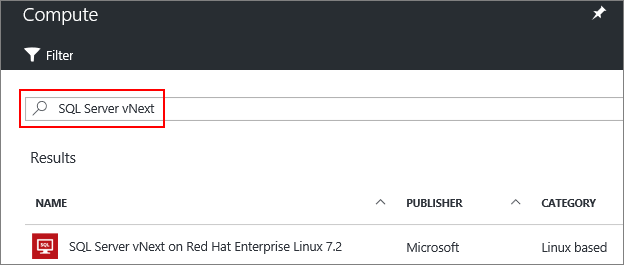
- Select a SQL Server vNext image from the search results.
- Click Create.
- On the Basics blade, fill in the details for your Linux VM.
- Click OK.
- On the Size blade, choose a machine size. For development and functional testing, we recommend a VM size of DS2 or higher. For performance testing, use DS13 or higher.

- Click Select.
- On the Settings blade, you can make changes to the settings or keep the default settings.
- Click OK.
- On the Summary page, click OK to create the VM.
Saturday, 19 November 2016
How to Delete a SCCM 2012 r2 Site System role
How to Delete a SCCM 2012 r2 Site System role
You can delete a site system using the Configuration Manager console by performing the procedure described:
- To delete a site system, all previously administrator-defined site system roles must be deleted. The ConfigMgr site system role is automatically added to any new site system created by the site component manager. Depending on the site role added, the Site component server role might also be assigned to the site system. These two roles cannot be added to a site system by the administrator and cannot be manually removed using the Configuration Manager console.
- A site system can be deleted when it is still assigned the ConfigMgr site system server role, but it cannot be deleted if it is still assigned the Site component server server role.
- In the Configuration Manager console of the primary site server, navigate to System CenterConfiguration Manager / Site Database / Site Management / <site code> - <site name> / Site Settings / Site Systems / <site system name>.
- Verify that no site roles are currently assigned to the site system other than the ConfigMgr site system role.
- Right-click <site system name> for the site system that you want to delete, and click Delete.
- Click Yes on the Confirm Delete dialog box.
Wednesday, 14 September 2016
Install-ADDSDomainController: PowerShell Command to Promote a Server to Domain Controller
PowerShell Command to Promote a Server to Domain Controller
-CriticalReplicationOnly:$false -DatabasePath "C:\Windows\NTDS" -DomainName "Contoso.com" `
-InstallDns:$true -LogPath "C:\Windows\NTDS" NoRebootOnCompletion:$false -SiteName `
"Default-First-Site-Name" `-SysvolPath "C:\Windows\SYSVOL" -Force:$true
- Install-ADDSDomainController will promote the Server to Domain Controller.
- -SkipPreChecks will skip the prechecks and will procced with the install
- -NoGlobalCatalog:$false Will not install Global Catalog Component on this server.
- -CreateDnsDelegation:$false Will not create DNS Delegation on this server
- -DatabasePath tell where should be the NTDS Folder Location
- -DomainName tell your Domain Name
- -InstallDns:$true Installs DNS Component on the server
- -LogPath tells the LogPath Location.
- NoRebootOnCompletion:$false Will not reboot the server after install.If you want to reboot make it $true
- -SiteName Enter the AD Site name where server has to be installed
- -SysvolPath Location of the Sysvol folder
Wednesday, 7 September 2016
How to restore a Corrupt SCOM Database in SCOM 2012 R2 Step by Step
How to restore a Corrupt SCOM Database in SCOM 2012 R2
- Sometimes the SCOM database gets corrupted because of disk issue.
- Restoring it from Backup is a very lengthy process and time consuming.
- Opening a ticket with Microsoft might help, but there default reply is to restore from last good backup
- So how you quickly recovery a corrupt SCOM database?. There is a way.
- First Stop all SCOM Services on your management server.
- Then Put the Corrupt SCOM database in SINGLE_USER Mode.
If you Operations Manager DB is corrupted Run the below command,
If you Operations Manager Datawhare house is corrupted Run the below command,
DBCC CHECKDB ('OperationsManagerDW', REPAIR_ALLOW_DATA_LOSS) WITH ALL_ERRORMSGS, NO_INFOMSGS
- Once completed you should be able to bring your database online
Tuesday, 12 April 2016
SCOM Management Server showing warning with Event ID 1825 - A security package specific error occurred
SCOM Management Server showing warning with "Event ID 1825 - A security package specific error occurred"
- Today when i checked the SCOM management Server it was in Warning state.
- When i open the health explorer i could see only "Failed to access event log" is selected and its in warning state with error in details "A security package specific error occurred".
- When i tried to access the event log from the SCOM management server it failed with the same error.
- so i decided to do a nslookup of the server and found that the reverse lookup is pointing to the alias of the server rather then the actual server name.
- Once it was resolved things got health again.
- So when you have this issue, its usually issue with the DNS entries which needs to be fixed
Thursday, 8 October 2015
How to view the dependencies for a management pack
How to view the dependencies for a management pack
Many times you want to know what management pack are the current MP depend on,
To view the dependencies for a management pack
- In the Operations console, in the Administration workspace, click Management Packs.
- Right-click the desired management pack, and then click Properties.
- In the Properties dialog box for the management pack, click the Dependencies tab.
- The Dependencies tab lists any management packs that the selected management pack depends on and any management packs that depend on the selected management pack.
What is a Management Pack in SCOM mean
What is a Management Pack in SCOM mean
- Generally when you explain to your top management about SCOM, you use the word Management pack. All of sudden on of the executive stopped and asked me what does Management Pack mean, So i taught it would be useful if i give some explanation here.
- Management packs typically contain monitoring settings for applications and services. After a management pack is imported into a management group, System Center 2012 – Operations Manager immediately begins monitoring objects based on default configurations and thresholds that are set by the management pack.
- Monitors, which direct an agent to track the state of various parts of a managed component.
- Rules, which direct an agent to collect performance and discovery data, send alerts and events, and more.
- Tasks, which define activities that can be executed by either the agent or the console.
- Knowledge, which provides textual advice to help operators diagnose and fix problems.
- Views, which offer customized user interfaces for monitoring and managing this component.
- Reports, which define specialized ways to report on information about this managed component.
- Object discoveries, which identify objects to be monitored.
- Run As profiles, which allow you to run different rules, tasks, monitors, or discoveries under different accounts on different computers.
Saturday, 4 July 2015
Step by Step instruction to Create a Windows 2012 R2 Server in Windows Azure
Step by Step instruction to Create a Windows 2012 R2 Server in Windows Azure
- Inorder to create a new Windows 2012 R2 server, login to your Azure portal and click on virtual machines Tab

- Now Click on "Create A Virtual Machine"

- Then Click Quick Create and select IMAGE which ever OS you want in this we will install "Windows Server 2012" and Configuration you want. Also give the admin Name and password of your VM and which region you want your VM to be in and click "Create Virutl Machine"
- This will start building your VM and it will be ready in few Minutes.


- One its ready Click on Connect in the Bottom and it will prompt you to open RDP file of server.Download the RDP file to your desktop


- Now Double click the RDP file and Click Connect. Enter the Username and Password and you will get the RDP of the server.
Tuesday, 19 May 2015
What is a Management Pack an What does it contain
What is a Management Pack an What does it contain
Management packs contain monitoring settings for applications and services. Once you import the management pack in SCOM 2012 R2 management group, it immediately begins monitoring objects based on configurations and thresholds that are set by the management pack.
Each management pack can contain any or all of the following:
- Monitors:It tells an agent to track the state of various parts of a managed component.
- Rules: It tells an agent to collect performance and discovery data, send alerts and events etc.
- Tasks: The activities that can be executed by either the agent or the console.
- Views: It offer customized user interfaces for monitoring and managing this component.
- Reports: It define specialized ways to report on information about this managed component.
- Object discoveries: which identify objects to be monitored.
- Knowledge Base: It provides Knowledge to help operators diagnose and fix problems.
Tuesday, 11 November 2014
Get-GPO:How to Get list of Group POlicy in your EnviRornment using Powershell
Get-GPO:How to Get list of Group Policy in your Environment using Powershell
GET-GPO is a very powerfull Command.It gets list of all GPO in your Domain.
To get a list of all GPO, thep
GET-GPO
You will get the below error
PS C:\Users\foxsha> GET-GPO
The term 'GET-GPO' is not recognized as the name of a cmdlet, function, script file, or operable program. Check the spe
lling of the name, or if a path was included, verify that the path is correct and try again.
At line:1 char:8
+ GET-GPO <<<<
+ CategoryInfo : ObjectNotFound: (GET-GPO:String) [], CommandNotFoundException
+ FullyQualifiedErrorId : CommandNotFoundException
The reason for this error is that there is no Module Available for Active Directory
So first Import the Module using Command
Import-Module "grouppolicy"
You will see the below error
PS C:\Users\foxsha> Import-Module "grouppolicy"
Import-Module : The specified module 'grouppolicy' was not loaded because no valid module file was found in any module
directory.
At line:1 char:14
+ Import-Module <<<< "grouppolicy"
+ CategoryInfo : ResourceUnavailable: (grouppolicy:String) [Import-Module], FileNotFoundException
+ FullyQualifiedErrorId : Modules_ModuleNotFound,Microsoft.PowerShell.Commands.ImportModuleCommand
The resaon for this error is that there is no Group policy Feature installed so first we need to install the group policy features
If you are on your desktop and not on Server,you need to go to below location and download and install it
Then go to Programs and Features in Control Panned .Click "Turn Windows Feature On or OFF " and select "Group policy management"
Now try " Import-Module "grouppolicy" and then GET-GPO and it will run sucesfully
Subscribe to:
Posts (Atom)